Saferwall v1.2.0 Release


Saferwall v1.2.0 is out. The headline features are deep archive scanning, encrypted document support, and API key authentication. We also rewired the internal scan pipeline and shipped a new AI-powered file-type detector under the hood.
Archive scanning
Malware is routinely distributed inside archives — often multi-layered or obfuscated. Until now, Saferwall treated an uploaded archive as a single opaque file. Starting with v1.2.0, every member file is extracted and run through the full scan pipeline (static analysis, all AV engines, and the sandbox).
Supported formats: ZIP, RAR, 7-Zip, TAR (including .tar.gz, .tar.bz2, .tar.xz, and other compressed variants).
A configurable limit caps extraction at 20 members by default (max_archive_files = 20 in the static service config) to prevent zip-bomb–style abuse.
File relationship model
The old flat archive_files / archive_sha256 fields are gone. They have been replaced with a richer, bi-directional model:
On the parent archive:
"derived_files": [
  { "name": "dropper.exe",  "sha256": "abc123…" },
  { "name": "loader.dll",   "sha256": "def456…" }
]
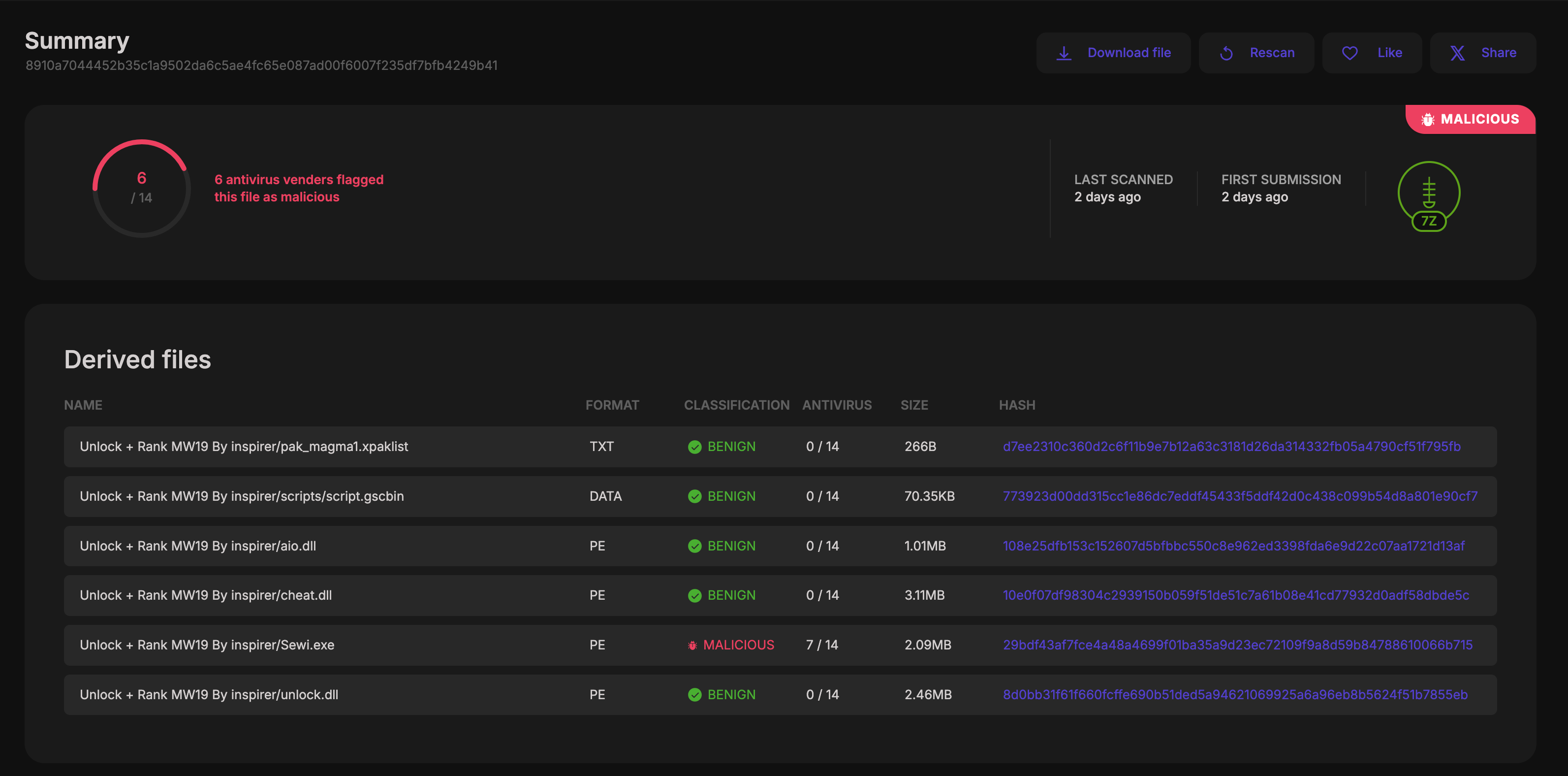
Each DerivedFile carries the original entry name (the path as it appeared inside the archive) and the SHA-256 of the extracted content.
On each extracted member:
"parent_sha256": "sha256-of-the-archive"
This bi-directional link lets you walk the full extraction tree in either direction and trace any extracted sample back to its container.
The scan report for an archive shows a Derived files table with per-member format, AV verdict, size, and hash — making it immediately clear which extracted file triggered a detection:
Resilience
The extractor tolerates malformed and partially-readable archives: if one member fails to extract, the rest are still processed. AV engine errors on archive-format files are now skipped gracefully.
Encrypted file support
Password-protected files are another standard evasion technique — analysts receive samples that cannot be opened without a password. Saferwall now handles this automatically for:
- Encrypted ZIP, RAR, 7-Zip archives — passwords are tried during extraction.
- Password-protected Office documents (
.docx,.xlsx,.pptx, legacy.doc/.xls). - Encrypted PDFs.
When a password unlocks a document, the decrypted content is enrolled as a brand-new sample and run through the full scan pipeline on its own. It shows up in derived_files on the parent, and carries parent_sha256 pointing back to the encrypted original.
Submitting passwords
Supply candidate passwords at upload time:
POST /v1/files
Content-Type: multipart/form-data

file=<binary>
passwords[]=infected
passwords[]=malware
passwords[]=virus
The platform also tries a built-in list of common malware-distribution passwords automatically, so you do not need to supply anything for the most common cases.
API fields
The File entity now exposes the full decryption audit trail:
| Field | Type | Description |
|---|---|---|
encrypted | boolean | true if the file requires a password |
decryption_success | boolean | true if a password worked (null when encrypted is false) |
attempted_passwords | string[] | All passwords that were tried |
successful_password | string | The password that succeeded |
The Submission entity records the passwords list you provided at upload time, giving full auditability.
API key authentication
You can now authenticate to the API using a long-lived API key instead of a session cookie or JWT. This is the recommended approach for automated workflows, CI pipelines, and integrations.
Generating a key
POST /v1/users/{username}/apikey/
Authorization: Bearer <jwt>
The response contains the raw key exactly once:
{ "api_key": "swak_…" }
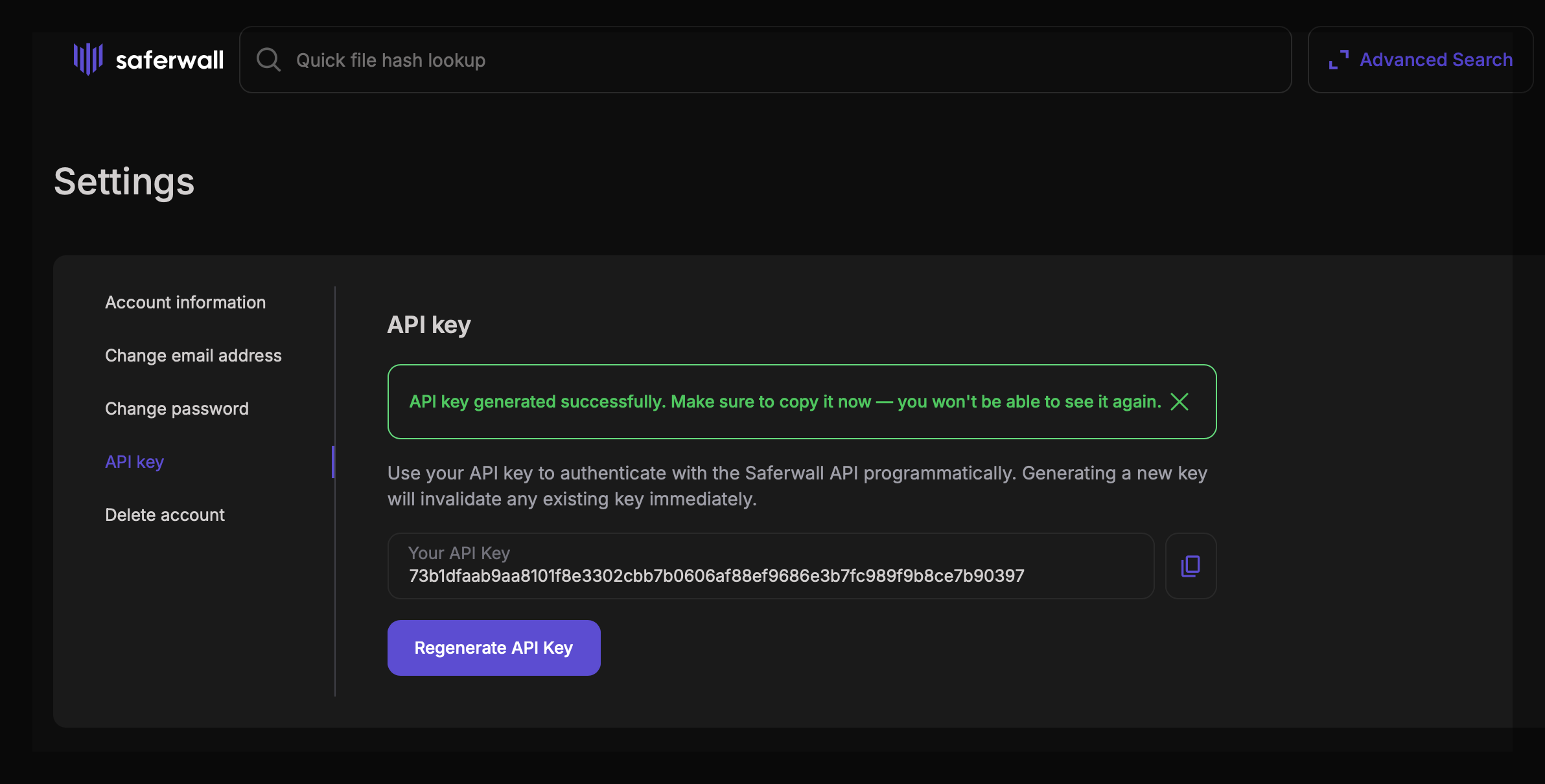
The raw key is never stored — only its SHA-256 hash is persisted in the database. Calling the endpoint again invalidates the previous key and issues a new one.
You can also generate and manage your key from Settings → API key in the web interface:
Using the key
Pass it in the X-Api-Key request header:
POST /v1/files
X-Api-Key: swak_…
Content-Type: multipart/form-data
…
The auth middleware checks for X-Api-Key first and falls back to JWT/cookie if the header is absent, so existing integrations keep working without changes.
Under the hood
Static service as scan orchestrator
The scan pipeline has been restructured. The static service is now the single entry point after a file is uploaded. It runs its own analysis first, then fans the request out to the MultiAV and sandbox topics. Previously all consumers raced off a shared topic — now there is one well-defined place to control which downstream services run and under what conditions (e.g. skip_detonation for files that do not warrant dynamic analysis).
Magika: AI-powered file-type detection
We integrated Google Magika (v1.1.0, built as a Rust CLI) alongside the existing libmagic and TrID detectors. Magika uses a deep-learning content-type model and significantly improves detection accuracy for file types that magic signatures misclassify — particularly office documents, scripts, and obfuscated payloads.
Distributed tracing
All Saferwall services (aggregator, static, MultiAV engines, sandbox, web-apis) now emit OpenTelemetry spans. Trace context is propagated end-to-end from file upload through every downstream scanner. Database operations and object storage calls are individually instrumented, making it straightforward to identify bottlenecks in a multi-service scan.
Reliability improvements
- AV engine liveness probes — unhealthy engines are detected and reported before a scan attempt.
- Exponential retry on MinIO
PutObject— transient object storage errors no longer drop samples. - Multiple goroutine and file descriptor leaks fixed in the static service.
- Race condition in the aggregator fixed.
- User avatars are now generated offline (no external Gravatar dependency).
- Full-text search index is created automatically at startup if it does not exist.
- Optional pprof profiling endpoints on every service — enable per service via
profiling.enable = truein the service config to expose Go'snet/http/pprofon a configurable address (disabled by default).
Upgrading
Follow the deployment guide to update your instance. If you maintain a generated API client, regenerate it from the updated OpenAPI spec — the File, Submission, and User entity schemas have changed.
Full changelog and Docker image at the GitHub releases page. Web-APIs changelog: v1.2.0.